
what did i learn from building this website?: pt.II technicals
this is part ii of my “what did i learn from building this website?” series. in this article, i’ll dive deep into the technical details from my personal perspective as a dev, which includes:
- challenges when i was working with responsive svg using ai
- my takes on nextjs with real personal examples when building this website
- some niche architectural choices for my “semi-private” blog
so this article is more for developers who’s interested in dx (developer experience) rather than being educational. for non-technical readers, you can know more about my motivation and design inspirations in pt.I design.
table of contents
- i. figma to code: responsive svg is painful
- ii. my take on nextjs: build frontend in a full-stack way
- iii. architecture of my blog
- iv. conclusion: think architecturally
i. figma to code: responsive svg is painful
to start off, my first thought was: “i want to include more non-rectangular containers so it doesn’t look like another shadcn/tailwind-style website”. so i designed a lot of unconventional shaped containers in figma for customization, and svg becomes one of the primary things i was working with during the start of this project.
svg is easy when used as logos and illustrations but it’s way more challenging than i originally thought when it’s used as a responsive container and here are the challenges i found:
challenges
1. scalable != responsive
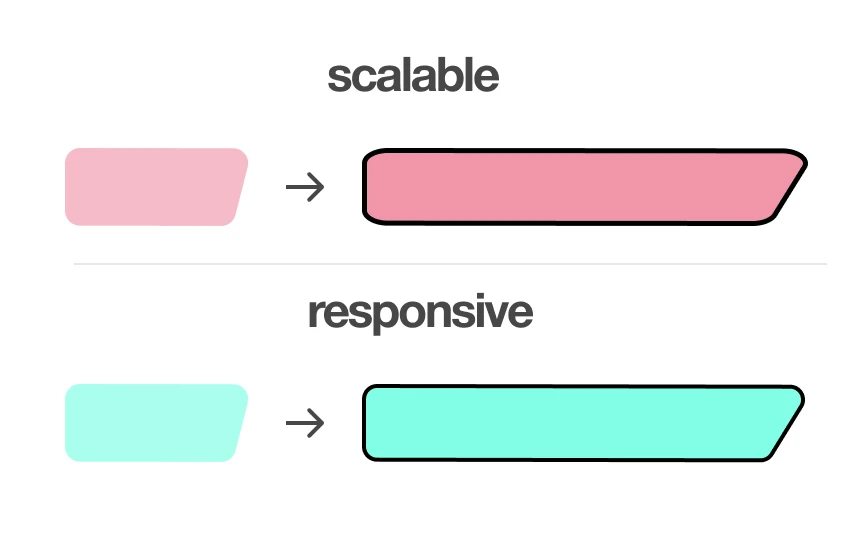
svg is meant to be scalable, right? but responsiveness is more than just scaling objects up or down. coming from modern css that has built-in rounded corners, it’s easy to overlook that responsive containers actually only scale along one axis while maintaining the same curvature of the corners. therefore, you can’t solely wrap flexboxes around them and call it a day.
2. where’s the middle point?
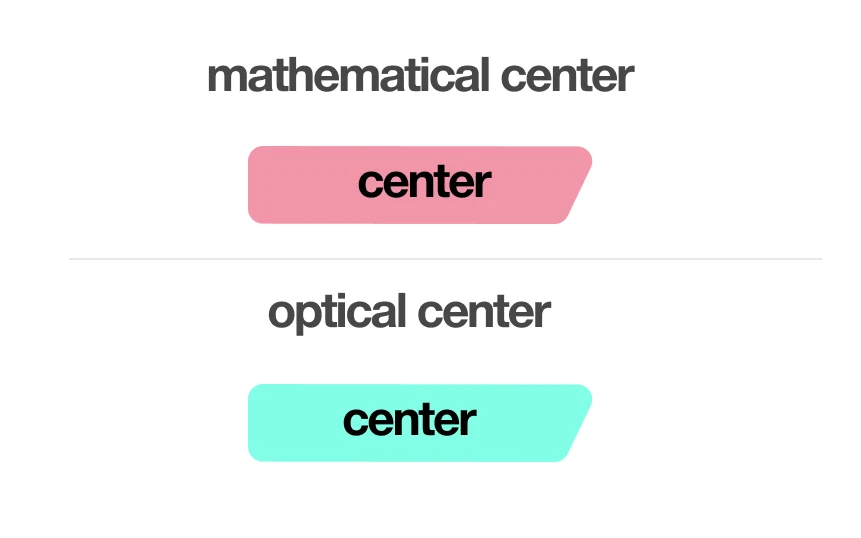
with modern css, the “how to center a div?” joke is becoming less funny because of flexbox and grid. however, for asymmetrical shaped svg, centering content is non-trivial because there’s not a strict mathematical definition of where’s the center point at. as a result, you’ll spend ridiculously more time to tweak the css back and forth to ensure the content doesn’t overflow.
3. svg is painful even for ai
svgs are images to us but they’re numbers to ai and everyone knows ai is bad at crunching numbers. in this case, things get worse because svgs also involve spatial reasoning, which is another skill that ai is lacking. so the actual assistance you get from ai is very limited. to support my argument, there’re research papers proposing dedicated methods for llms to understand svgs better and using svg to benchmark llms.
references: An Investigation on LLMs’ Visual Understanding Ability Using SVG for Image-Text Bridging SVGenius: Benchmarking LLMs in SVG Understanding, Editing and Generation
all these add up makes svg a nightmare to work with but here are the “painkillers” i came up with to minimize the hassle:
solutions
1. divide svg into segments
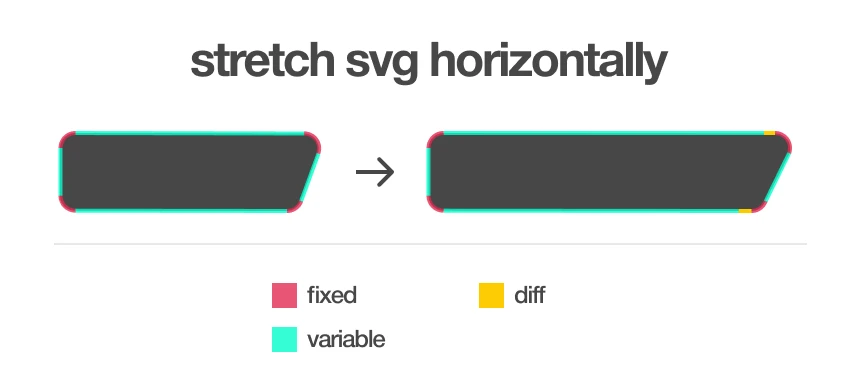
this is the single best piece of advice that i wish somebody told me at the time. dividing segments that you want to be stretched and fixed. for example, you can divide the horizontal lines from other lines in this shape, so that it’s easier to control and only shrink the horizontal lines in the mobile version. in figma, you can easily do that with ctrl + g (group) and ctrl + e (flatten).
2. kiss (keep it simple, stupid)
avoid using fancy tags like <foreignObject/> or guessing values for the dimensions. they tend to interact badly with your other stylings, and width/height and viewbox are using different coordinate systems (absolute and relative). instead, keep it simple, use the same dimensions in your figma as the source of truth, and mirror the values with normal <svg>.
3. understanding the css box model
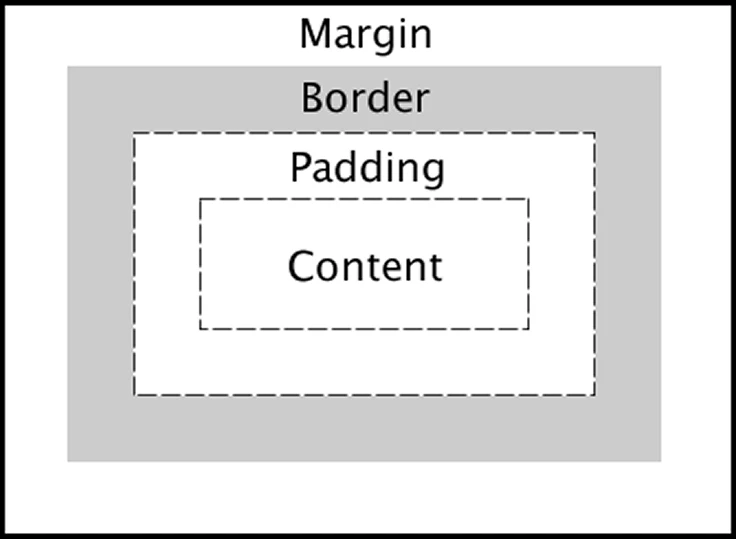
this might be cliche but understanding the css box model is important, even the surface level of it will help. from my experience, the ai keeps adding layers of <div/> as you ask it to tinker the css from time. this will mess up your codebase as well as the stylings and layout around with it in long term. even though your containers are not boxes, you should treat them like boxes because that’s just how they work in practice. stop wasting tokens anymore if you don’t get what you want at the first shot. tell the ai the mental box model that you want it to follow is far more effective.
ii. my take on nextjs: build frontend in a full-stack way
moving onto the “spine” of this website, i used nextjs as the web framework. partly because i was REALLY struggling with nextjs during my internship at the time and i wanted to improve my skills through this project. but anyway, after having a bittersweet learning experience with it, i want to share my thoughts on it because it’s been a hot topic among both experienced and new web devs. therefore i think i can kind of bring a new perspective as a person who was “forced” to learn it in such a short period of time (not super experienced but definitely not new lol).
1. nextjs IS a full-stack framework
“nextjs is a react but a full-stack framework?” yup, that’s my first thought. nextjs has a LOT of rendering methods that can pre-render the code on the server to improve initial loading performance. the idea itself is not new and it’s actually quite controversial. it essentially blurs the line between frontend and backend so that even experienced dev might find it confusing to work with. for me, though, the complexity was exactly why i found it’s interesting. it forces me to structure my code in a “client-server model” mindset even when i’m just working on the frontend.
to illustrate it’s a full-stack framework, different rendering methods will directly affect the backend data fetching pipeline vastly. for example, to choose components for fetching data, you can either:
i. use server actions
- use a server component as a wrapper with server actions to fetch data and pass the data as props to a client component for displaying dynamic content
ii. go traditional
- set up an api route and a client component to fetch data from the client side
even crazier, besides csr (client side rendering) and ssr (server side rendering), nextjs also supports ssg (static site generation), isr (incremental static regeneration) and dynamic imports. you can learn more about nextjs rendering methods in iii. architecture of my blog. and here i’ll use two features of my site using ssg and dynamic imports to elaborate on different data fetching techniques.
iii. fetching data for ssg pages
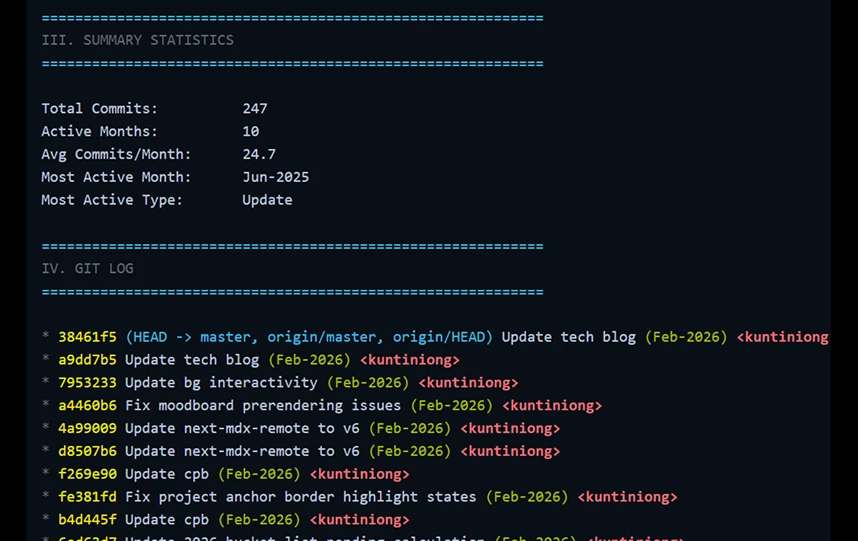
- i have a feature to show my full git history in a mdx page. so the only way to fetch data is during build time because a mdx page is statically generated. however, vercel only does shallow clone (like cloning the most recent 30 commits) to speed up its clone process. so what i did was to write a script to fetch the full history during “dev time” locally and then another script to fetch the latest commit during build time.
iv. dynamic importing heavy 3d assets

- one asset running threejs is already resource-intensive, but i’m running six of them (the 3d badges with interactive physics in my about page). so at first, the about page was lagging because the page was waiting the badges to be loaded. but after i dynamic imported the badges and some crazy optimizations i’ve done on them (found a website to convert
.glbtexture to.webp, a super niche feature indeed), it’s not perfect but it’s significantly faster because the assets were set to be imported for seconds after the rest of the page is loaded.
2. is nextjs overengineered?
HOWEVER, if you don’t really care about the performance, it’s super reasonable to think these things are way overengineered or at least the tradeoff between performance and complexity isn’t worth it. i respect that and here are some concerns i came up with if i’m starting a new project and ask myself “why do you pick nextjs over react?”:
i. do you really need ssg for most of the time?
- in my experience, it’s easy to have unexpected rendering behavior if you’re not careful with it. for example, it might not be worth it if you’re building an internal system that doesn’t require seo.
ii. can you compromise the complexity it brings for using server components?
- your same feature across client and server components will require different setups (e.g. server components can’t use hooks)
- and scenarios like the container is interactive but the content is static, you can’t wrap the whole thing in a client component
that said though, you’ll still benefit from the pre-built html even if you go for using all client components.
3. conclusion: nextjs vs pure react
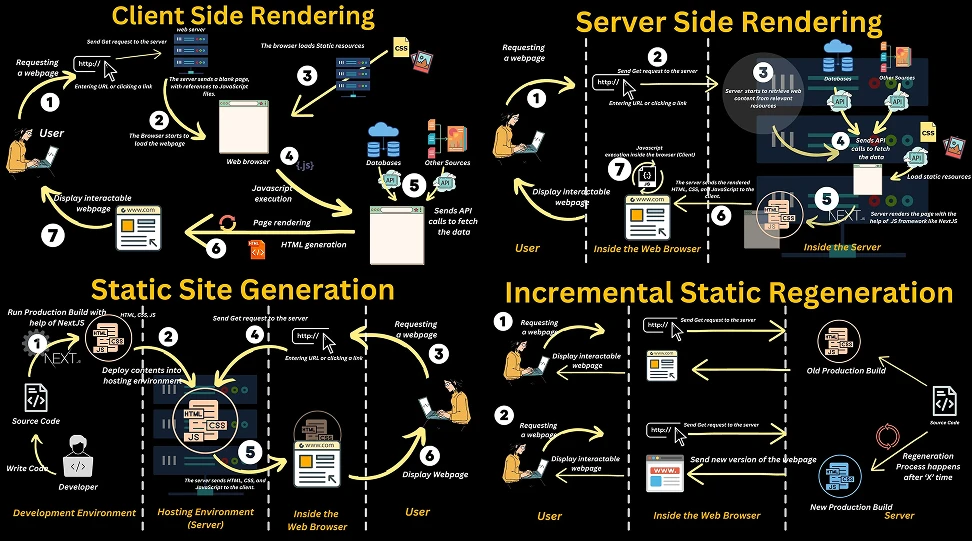
to conclude, i think nextjs is a good mental exercise for a dev who primarily only worked with frontend like me to build a project from a system-design perspective, super rewarding and honestly it paved the path for me to getting into more serious cloud and backend development. but in production, i think there’s still a caveat for big companies staying away from nextjs. obviously it isn’t about their developers’ skills, but it’s that they simply can’t risk the obscurity of the hybrid structure making them harder to debug. so that’s why i think big companies will still be using pure react and i don’t see they’ll be going anytime soon.
image credits: https://blog.devgenius.io/rendering-strategies-in-next-js-1012162bef95
iii. architecture of my blog
1. nextjs rendering methods
before going into the architecture of my blog, here are some information about nextjs rendering methods (feel free to skip this part if you’re familiar with nextjs):
| method | full form | description |
|---|---|---|
| ssg | static site generation | build static html files using generateStaticParams at build time only, like a snapshot |
| ssr | server side rendering | build html files & run js code on the go at the server side whenever requested at runtime |
| isr* | incremental static regeneration | auto build (revalidate) html files periodically at the server side based on previous builds (cache) with generateStaticParams |
| csr^ | client side rendering | build html files at the server side and mount it to the js/react code on the client side (hydration) to provide interactivity |
| dynamic imports | / | not really a rendering method but it suspenses to import (heavy) components during initial loading |
* isr sits at the middle of ssr and ssg. it builds at runtime periodically while using ssg technology.
^ nextjs doesn’t have “pure” client side rendering
2. understanding “traditional mdx” vs “next-mdx-remote”
speaking of blog, using mdx (markdown + jsx) is a natural choice for me because i write everything with markdown (i even built my own markdown editor) and the additional jsx allows me to do some quirky stuff. here i’ll go through my thought process in choosing the architecture and technology of my blog. i believe it’s the most evident example to illustrate that “using the client-server model mindset” to structure my code even though i haven’t had a separate backend (yet).
here are the two mainstream technologies to build a mdx blog:
| traditional mdx | next-mdx-remote | |
|---|---|---|
| design philosophy | mdx-as-module | mdx-as-data |
| behavior | mdx is tightly coupled to the repo | mdx can be fetched anywhere as a form of data |
| setup difficulty | simpler | harder |
| scalability | small (repo only) | large (store in a db) |
e.g. so even using isr with the traditional method, it’s basically meaningless because mdx must be stored in the repo and it requires to rebuild the whole app when you make updates. whereas with remote, you can store your mdx in a dedicated db and use isr to do periodic builds.
to explain why i went for next-mdx-remote in my blog, here’s a practical comparison between using two technologies when i was implementing the “related posts” feature in my blog:
i. using next-mdx-remote
- i can use server actions to fetch the metadata (frontmatter) dynamically because remote requests data on demand and has the flexibility to behave just like normal api calls
- pros: it’s easier if i want to scale up the number of posts and migrate my posts to a db (which eventually i will because i got lots of images and my git’s gonna explode) because it process metadata on demand
ii. using traditional mdx
- i can only run a script to parse the metadata and export the slugs to a file at build time because mdx files are treated as modules
- cons: the build process will significantly slow down once you get big because it has to parse the all the metadata at build time
3. rendering & data fetching logic in my blog
despite it’s a blog that’s supposed to be a platform for my thoughts to reach to more people, to me, my website is more like a “life os” where i can document my growth for me to take a self-reflection. so not everything i wrote here i’m comfortable to share to the public. so that’s why i chose to go with a “semi-private” architecture for my blog and it includes two types of posts:
i. public posts
- i’m not going to disclose what makes up a public post but essentially it’s just content i feel comfortable share and discuss with the public. it doesn’t require any form of authentication.
- approach: just use normal ssg with
generateStaticParams(fetch mdx data in a server component and compile mdx at build time)
ii. private posts
by literal meaning, it’s private and requires authentication and here are two authentication workflows that i considered when i built it:
option a: api (request for auth) + server actions (validates) + ssg/isr (built html already)
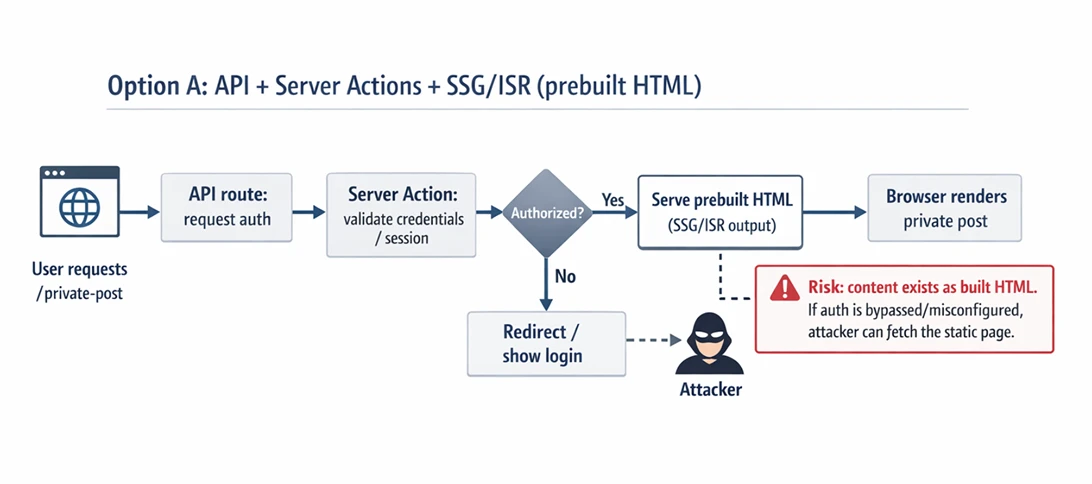
- it’s vulnerable because the attacker can access the protected page if he bypasses the auth
option b: api (request for auth) + server actions (validates) + ssr (build html)
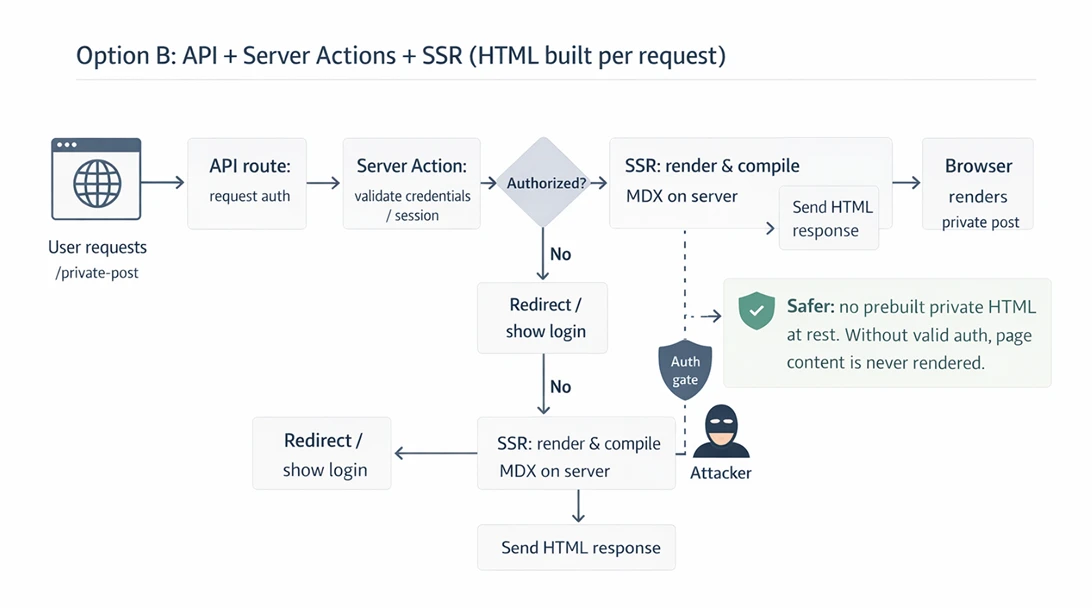
- it’s safer because the html is not built yet, attacker can’t access to the page even he bypasses the auth. so i went with option b.
4. complete architecture
here’s the complete picture of my blog:
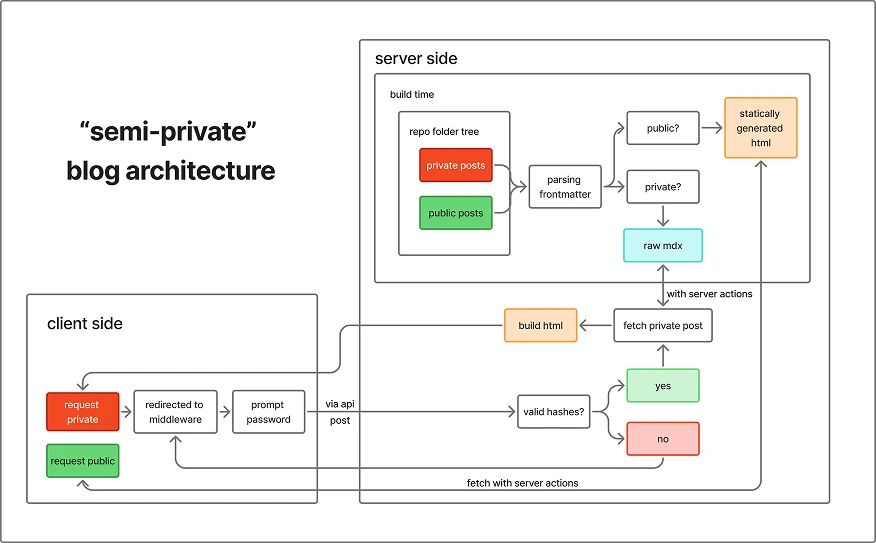
-
private & public live in the same folder but private contains
private: truein the frontmatter -
at build time, run a script to traverse all the mdx’s frontmatter in the folder, filter and export the slugs of the private ones in a file, and only ssg the public ones
-
at run time, add a middleware to prompt the user password when they hit the private slugs
-
then the hashed password will be sent to the server (an api route here) to compare
-
if the password is valid, then it triggers a server action to ssr the targeted mdx and send the static html back to the user. that’s it :)
iv. conclusion: think architecturally
to wrap up, for all the readers who read this far, i know it’s a long one and i truly appreciate it. i don’t know if you’ve noticed that even though it claims to be a “technical” blog, i barely included any code and i kept things very high-level. that’s because i believe in this ai era, it’s more critical to solve a problem from an architectural standpoint and ai will handle the coding for you. i mean i believe most of the problems i described here can’t be fully solved by ai (yet). it still involves human judgement and my role is more like the “product manager” orchestrating my ai workers to work the way i want by giving them comprehensive specs. so from this project, i wouldn’t say i learned how to code, but i learned how to frame a problem in a way that’s easier for others to work on.
peace.